
Top 5 Gemini AI Photo Prompts for Boys in 2026: Create Stylish, Realistic Photos
Table of Contents
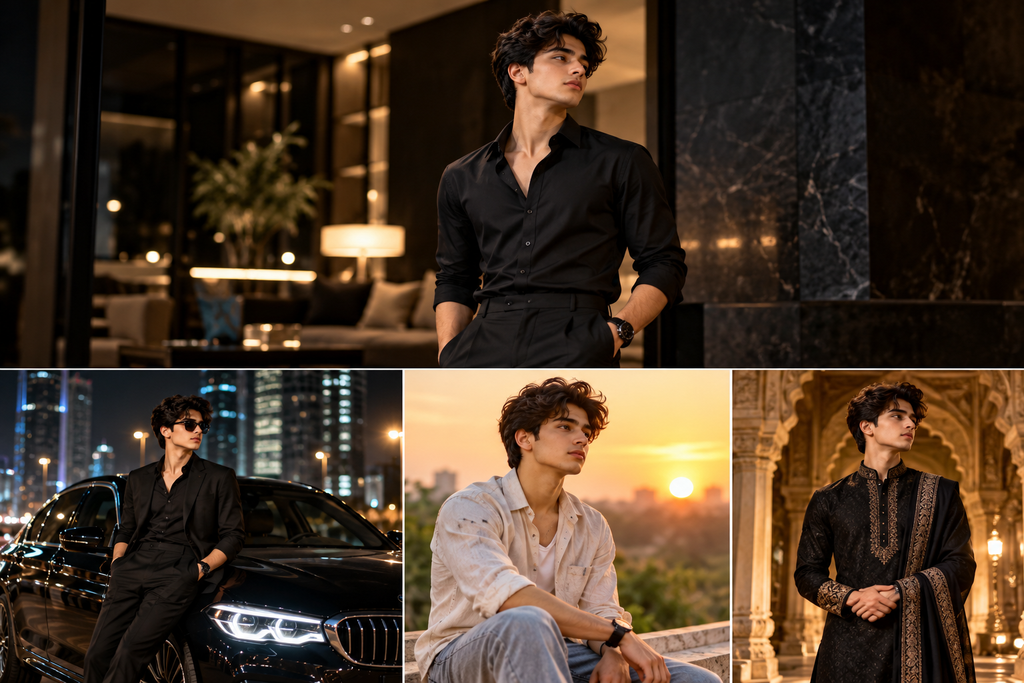
Have you ever seen a stylish portrait on Instagram and wondered how it was created? The cinematic lighting, perfect background, fashionable outfit, and professional photography can make an ordinary photo look like it came from a photoshoot. The good news is that you can experiment with similar styles using AI image-generation tools and a well-written prompt.
In this guide, we are sharing five carefully written Gemini AI photo prompts for boys that you can copy, customize, and try with your own photos. Whether you prefer a classy black outfit, a luxury lifestyle look, a natural outdoor portrait, a traditional Indian style, or a cinematic rainy-city photo, there is an idea here for you.
You do not need to be a professional photographer to get started. You mainly need a suitable reference photo, a clear description of the style you want, and a little patience to experiment with the results.
Let’s explore the prompts and learn how to use them effectively.\
What Are Gemini AI Photo Prompts?
Gemini AI photo prompts are written instructions that describe the image you want an AI tool to generate or edit. Depending on the tool and features available to your account, you may be able to create a new image, edit an existing image, or use a reference photograph to guide the result.
A prompt can describe several things, including your clothing, pose, background, lighting, camera angle, and overall photography style.
For example, simply writing “make my photo stylish” does not explain exactly what you want. A more detailed instruction might describe a black outfit, a modern interior, soft cinematic lighting, realistic skin texture, and a portrait-oriented composition.
The additional details give the image generator clearer guidance. However, even a detailed prompt cannot guarantee a perfect result every time. You may need to adjust the wording or try a few variations.
For this article, we have selected five different styles that you can experiment with for profile pictures, social media posts, and personal photography projects.
Before You Start: How to Get Better AI Photos
Before copying the prompts, follow these simple tips to improve your chances of getting a result you like.
Choose a clear reference photo. If you want the generated image to resemble you, start with a well-lit photo in which your face is clearly visible. Avoid heavily filtered images, extreme angles, and photographs that are too blurry.
Describe the style clearly. Include the outfit, location, lighting, mood, and composition you want. Specific instructions usually provide more useful guidance than a single vague sentence.
Keep your expectations realistic. AI-generated images can occasionally produce unusual hands, distorted accessories, inconsistent clothing details, or facial changes. Review the result before publishing it.
Make small changes instead of rewriting everything. If the background looks good but the lighting is too dark, ask for softer lighting while keeping the other elements unchanged.
Use your own photos or images you have permission to use. Do not upload someone else’s private photographs without permission. Also, check the applicable tool’s terms and privacy settings before uploading personal images.
Now, let’s look at five prompts you can copy and try.
1. Cinematic Black Outfit Photo Prompt for Boys
A black outfit can create a timeless, sophisticated look. Combined with a modern background and controlled lighting, it can produce a portrait that feels similar to a fashion editorial or professional studio photograph.
This style works well for people who prefer a clean, mature aesthetic rather than bright colors or heavily edited effects. You can experiment with it for Instagram profile pictures, WhatsApp display pictures, and personal social media posts.
Copy This Gemini AI Photo Prompt
Create a photorealistic cinematic portrait of me wearing a fitted black shirt and black trousers, standing confidently in a stylish modern interior. Use soft directional lighting with gentle shadows to create depth and a sophisticated atmosphere. Keep the background elegant and uncluttered, with realistic materials and subtle details. Preserve my recognizable facial features from the uploaded reference photo as closely as possible. Use natural skin texture, realistic proportions, detailed fabric, and professional portrait photography with a shallow depth of field. The final image should look like a high-quality fashion editorial photograph, not an illustration. Use a vertical 4:5 composition suitable for Instagram.
How to Customize This Prompt
You can change the outfit, background, or mood without changing the overall concept.
For a more casual look, replace the fitted shirt with a black T-shirt and jeans. For a formal appearance, request a black blazer and polished shoes. If you prefer an outdoor setting, ask for a modern architectural background with soft evening light.
You can also request a waist-up portrait or a full-body composition, depending on how you plan to use the image.

Tips for Better Results
- Use a reference image with a clear view of your face.
- Ask for natural skin texture rather than excessive smoothing.
- Keep the background simple if you want the outfit to stand out.
- If the result looks too dark, request brighter facial lighting while retaining the cinematic mood.
Best for: Stylish portraits, profile pictures, fashion-inspired posts, and minimalist social media aesthetics.
2. Luxury Car Photo Prompt for Boys
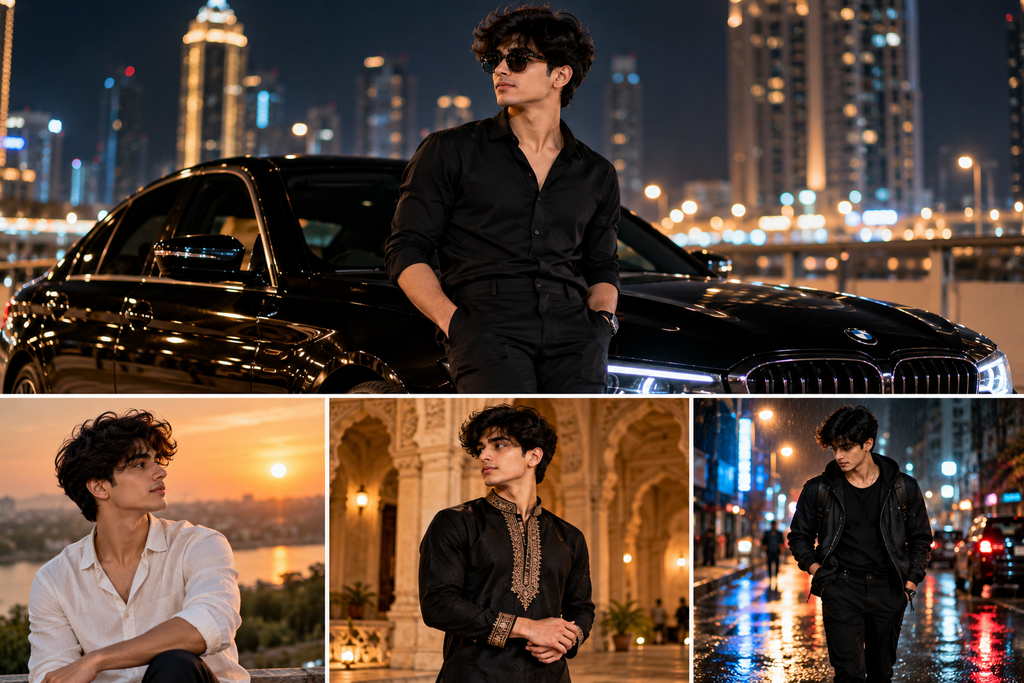
If you like luxury-inspired photography, try a portrait featuring a premium-looking car and a nighttime city background. The goal is to create a polished editorial image with reflections, atmospheric lighting, and a well-composed subject.
You do not need to own a luxury car to experiment with this visual concept. An AI-generated scene can help you explore the style, although the final image should not be presented as proof that you actually own or visited something shown in it.
Copy This Gemini AI Photo Prompt
Create a photorealistic editorial portrait of me standing beside an elegant black luxury car on a modern city street at night. Dress me in a well-fitted dark outfit with clean styling and realistic fabric details. Add tasteful city lights in the background, subtle reflections on the car’s bodywork, and realistic reflections on the pavement. Use balanced cinematic lighting so that my face remains clearly visible without looking artificially bright. Preserve my recognizable facial features from the uploaded reference photo as closely as possible. Maintain natural skin texture, realistic body proportions, and accurate perspective. The image should resemble professional automotive lifestyle photography, with a sophisticated atmosphere and a softly blurred background. Use a vertical 4:5 composition.
How to Customize This Prompt
You can replace the nighttime city with a modern parking area, a quiet urban street, or an architectural setting with soft evening light.
For a more understated style, request a neutral-colored outfit and a less dramatic background. If you prefer a brighter image, ask for early-evening lighting instead of a dark nighttime scene.
You can also specify a three-quarter pose, a waist-up composition, or a full-body photograph. Remember that adding too many visual elements can sometimes make the image less coherent, so begin with the main idea and adjust gradually.
Tips for Better Results
- Keep the car and subject positioned naturally within the frame.
- Ask for realistic reflections and consistent lighting.
- Avoid adding too many background lights or decorative effects.
- Check the car’s shape, wheels, and other details before publishing the image.
Best for: Luxury-inspired portraits, automotive aesthetics, cinematic social media posts, and fashion photography experiments.
3. Golden-Hour Outdoor Photo Prompt for Boys
Not every good portrait needs a dramatic city background or a luxury setting. Natural outdoor photography can look equally appealing, particularly when warm sunlight, soft backgrounds, and realistic colors work together.
Golden hour refers to the period around sunrise or sunset when sunlight often appears warmer and softer. This type of lighting can give portraits a relaxed, natural atmosphere.
If you prefer photos that look less artificial, this is a useful style to try.
Copy This Gemini AI Photo Prompt
Create a photorealistic outdoor portrait of me standing in a beautiful natural setting during golden hour. Use warm, soft sunlight to illuminate my face naturally, with gentle shadows and a softly blurred background. Dress me in a stylish casual outfit with realistic fabric textures and natural colors. Preserve my recognizable facial features from the uploaded reference photo as closely as possible. Keep my skin texture realistic and avoid excessive retouching, artificial facial smoothing, or exaggerated color effects. Use professional portrait photography, a natural-looking perspective, and a shallow depth of field. The final photograph should feel relaxed, authentic, and elegant, as if captured by a professional photographer outdoors. Use a vertical 4:5 composition suitable for social media.
How to Customize This Prompt
Try a green park, a garden, a quiet street, or an open landscape as the background. You can also change the outfit to a plain T-shirt, a casual shirt, or a lightweight jacket.
If you want a warmer appearance, request soft amber sunlight. If you prefer a cooler, more natural look, ask for balanced daylight colors and minimal color grading.
For a more candid result, request that the subject look slightly away from the camera rather than directly into it.
Tips for Better Results
- Ask for soft, natural-looking light rather than intense orange effects.
- Use a background that complements the outfit.
- Request realistic skin details and natural proportions.
- Avoid excessive blur if you want the surroundings to remain recognizable.
Best for: Natural profile pictures, casual portraits, outdoor photography, and clean Instagram aesthetics.
4. Traditional Indian Royal Look Photo Prompt for Boys
Traditional Indian clothing offers many possibilities for elegant portrait photography. A well-styled kurta, a heritage-inspired background, and warm lighting can create a refined look suitable for festive occasions and cultural themes.
This prompt is particularly useful if you want something different from the usual Western streetwear or black-outfit portrait.
The idea is to combine traditional clothing with realistic photography rather than making the result look like a painting or a fantasy illustration.

Copy This Gemini AI Photo Prompt
Create a photorealistic portrait of me wearing an elegant dark traditional Indian kurta with tasteful detailing. Place me in a refined heritage-inspired setting with traditional architectural elements and warm, soft lighting. Keep the background sophisticated and realistic, with subtle decorative details that complement the outfit without distracting from the subject. Preserve my recognizable facial features from the uploaded reference photo as closely as possible. Use realistic skin texture, natural facial proportions, detailed clothing fabric, and professional fashion portrait photography. The pose should look relaxed and confident, with natural posture and realistic hands. Avoid excessive ornamentation, unrealistic jewelry, or artificial skin smoothing. Use a vertical 4:5 composition suitable for social media.
How to Customize This Prompt
For a festive look, you can specify a cream or ivory kurta with subtle embroidery. For a more formal appearance, try a dark kurta with a simple jacket.
You can also experiment with a traditional courtyard, a heritage-style corridor, or a neutral studio background. If you want the outfit to be the main focus, ask for fewer decorative elements behind the subject.
If the image is intended for a real festival or event announcement, make sure it does not imply that the AI-generated setting is an actual photograph of the event.
Tips for Better Results
- Describe the clothing fabric and color clearly.
- Keep the architecture complementary to the outfit.
- Ask for realistic embroidery and natural fabric folds.
- Review the hands, jewelry, and clothing details for visual errors.
Best for: Festive portraits, traditional fashion, cultural celebrations, and elegant profile pictures.
5. Rainy City Cinematic Photo Prompt for Boys
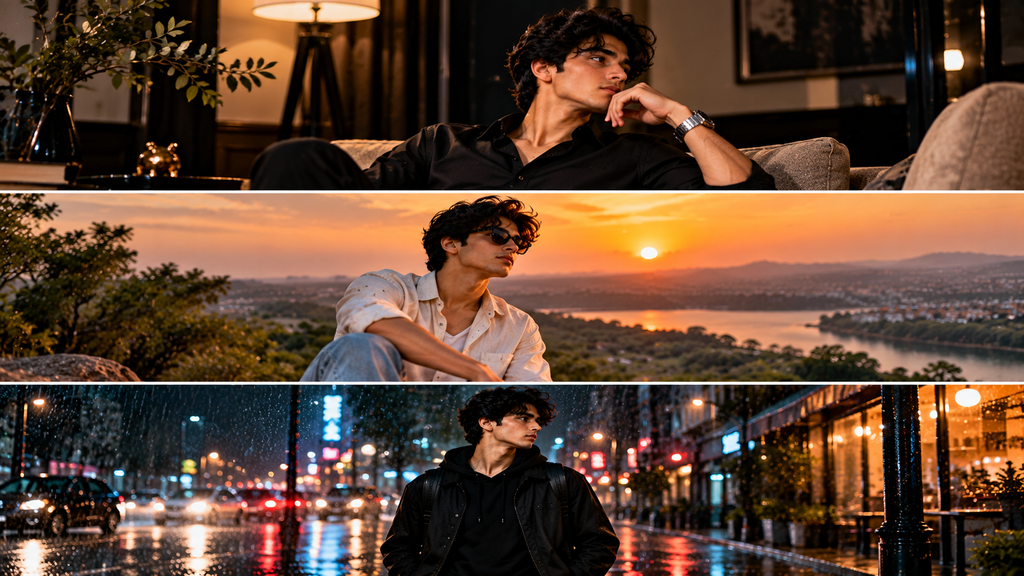
Rainy-city portraits can create an atmospheric, cinematic look through wet pavement, reflected lights, and a darker background. This style is ideal if you like dramatic photography but want something different from a luxury car or studio portrait.
The key is to balance the moody environment with enough light on the face. If everything is too dark, the subject can become difficult to see.
Copy This Gemini AI Photo Prompt
Create a photorealistic cinematic portrait of me walking along a modern city street shortly after rainfall. Dress me in a stylish dark jacket and well-fitted trousers. Add realistic wet pavement with subtle reflections from nearby streetlights and softly blurred city lights in the background. Use moody but balanced lighting, with enough soft light on my face to preserve natural details. Preserve my recognizable facial features from the uploaded reference photo as closely as possible. Keep the body proportions, clothing, reflections, and surroundings realistic. Use professional street photography with a shallow depth of field, restrained cinematic color grading, and natural skin texture. Avoid exaggerated neon colors, artificial rain effects, and excessive sharpening. Use a vertical 4:5 composition suitable for Instagram.
How to Customize This Prompt
You can request a close-up portrait instead of a full-body photograph. You can also replace the dark jacket with a hoodie, an overcoat, or another outfit that fits the mood.
For a more colorful result, request subtle blue or amber lights in the distance. For a natural street-photography appearance, ask for neutral colors and restrained contrast.
If the generated image looks overly artificial, reduce the amount of rain, reflections, and background lighting rather than adding more effects.
Tips for Better Results
- Keep the face sufficiently illuminated.
- Ask for realistic wet surfaces and reflections.
- Avoid excessive neon lighting if you prefer a natural look.
- Review the background for distorted signs, vehicles, or architectural details.
Best for: Cinematic portraits, moody profile pictures, streetwear photography, and dramatic social media edits.
How to Use These Gemini AI Photo Prompts Step by Step
Once you have selected a prompt, follow these steps to try it with a compatible image-generation or photo-editing feature.
Step 1: Open a Compatible AI Tool
Open Google Gemini or another AI image tool that supports the type of image generation or editing you want to perform. Available features may differ depending on the tool, account, region, and current product settings.
Step 2: Choose a Suitable Reference Photo
If you want the result to resemble you, choose a clear photograph with good lighting and visible facial features. Use a photo that you own or have permission to upload.
A front-facing or slightly angled photograph is often a useful starting point. Avoid images with heavy filters or large objects covering the face.
Step 3: Copy One of the Prompts
Choose one of the five prompts above and copy it into the tool’s prompt field. If image uploads are supported, attach your reference photo and explain that you want to use it as a visual reference.
Step 4: Generate the Image
Submit your instructions and wait for the tool to process the request. The available generation time and usage limits depend on the service.
Review the result before deciding whether it meets your expectations.
Step 5: Refine the Result
If the first attempt is not quite right, use a short follow-up instruction. For example:
- “Keep the same outfit but make the background brighter.”
- “Make the lighting softer and the skin texture more natural.”
- “Keep the composition but make the pose more relaxed.”
- “Reduce the color saturation and make the image look more realistic.”
Making one or two targeted changes can be easier than starting from scratch.
Step 6: Save and Prepare the Image for Social Media
If the tool allows you to download the result, save it in a suitable quality and aspect ratio. A 4:5 portrait is useful for many Instagram feed posts, while a 9:16 composition is generally better suited to vertical Stories and Reels.
Check the image for unwanted artifacts before uploading it.
Why Does Gemini Sometimes Change Your Face?
One common frustration with AI photo editing is that the result may look stylish but not closely resemble the original person.
This can happen because an image generator interprets the written instructions and reference image rather than guaranteeing an exact reproduction of every facial feature.
To improve consistency, try the following:
Use a clear reference image. A well-lit image with a visible face gives the tool more useful information.
Keep your instructions focused. Instead of describing dozens of changes at once, specify the main elements you want to alter, such as the outfit, background, or lighting.
Explicitly request identity consistency. You can write, “Preserve the recognizable facial features and overall appearance from my reference photo.” This may help guide the result, although it does not guarantee an exact match.
Avoid unnecessary facial transformations. If your goal is to change the background or clothing, say so explicitly and ask the tool to keep the face as consistent as possible.
Try another generation if needed. AI results can vary, and you may need multiple attempts to obtain a suitable image.
Always review the final image carefully, especially if you plan to use it as a professional profile photograph.

Tips for Writing Better AI Photo Prompts
A useful prompt does not have to be extremely long. It should provide enough detail to communicate your desired result without creating conflicting instructions.
Here are the main elements to consider.
1. Subject
Describe who or what should appear in the image. If you are using a reference photo, explain how it should guide the subject’s appearance.
2. Clothing and Styling
Mention the outfit, colors, fabric, and general aesthetic. For example, you might specify a black shirt, a traditional kurta, or a casual jacket.
3. Background
Describe the setting clearly. A modern interior, a garden at sunset, a heritage-inspired corridor, and a rainy city street each create a different visual mood.
4. Lighting
Lighting can dramatically affect the result. Soft daylight, warm golden-hour light, studio lighting, and cinematic nighttime lighting produce different appearances.
5. Photography Style
Terms such as “professional portrait photography,” “editorial fashion photography,” and “natural skin texture” can help communicate the intended visual direction.
6. Composition
Specify whether you want a close-up, waist-up, or full-body image. You can also request a vertical aspect ratio for social media.
7. Realism
If you want a realistic photograph rather than an illustration, say so clearly. You can request realistic proportions, natural skin texture, and restrained color grading.
The most effective approach is to start with a clear description and adjust the prompt based on the actual output.
Frequently Asked Questions
1. Are these Gemini AI photo prompts free to use?
The prompts in this article are available to copy and try. However, generating images may require access to a compatible AI tool, and that service may have usage limits, paid features, or other restrictions. Check the current terms of the service you choose.
2. Can I use these prompts for my own photos?
Yes. You can try them with your own photographs in a tool that supports image editing or reference-image generation. The final result will depend on the tool, the quality of your reference image, and your instructions.
3. Can Gemini create realistic photos of boys?
Compatible image-generation features can create realistic-looking portraits, fashion images, and other visual styles. However, results vary. Generated images may contain visual mistakes or differ from the intended appearance.
4. Which prompt is best for an Instagram profile picture?
The cinematic black outfit and golden-hour outdoor prompts are good starting points. Choose the style that matches your personality and the kind of profile image you want.
5. How can I make an AI-generated photo look more natural?
Use clear instructions, realistic lighting, natural skin texture, and a simple background. Avoid requesting too many dramatic effects at once. Review the result and make small changes when necessary.
6. Why does my generated photo look different from my original picture?
Image generators may interpret facial features differently during generation or editing. A clearer reference photo and specific instructions about preserving recognizable features may help, but exact identity preservation is not guaranteed.
7. Can I use these prompts for other AI image generators?
You can adapt the written prompts for other tools that support similar image-generation or editing tasks. Some services may require different wording or offer different controls, so results will not necessarily be identical.
8. Which aspect ratio should I use for Instagram?
A vertical 4:5 image is a useful choice for Instagram feed portraits. A 9:16 image is generally more suitable for Stories and Reels. Check the platform’s current specifications before publishing.
9. Can I publish AI-generated photos on my website?
You can publish images when you have the necessary rights and comply with the relevant tool’s terms and applicable laws. Review the images for misleading representations, privacy concerns, and unwanted artifacts. Use original or properly licensed images rather than copying other websites’ photographs.
10. Do longer prompts always produce better images?
No. A longer prompt is not automatically better. Clear, relevant details are more useful than unnecessary wording. Start with the main subject, outfit, setting, lighting, and composition, then refine the instructions if needed.
Final Thoughts
Creating a stylish portrait no longer requires you to understand every detail of professional photography. With a clear prompt and a suitable AI image tool, you can experiment with different outfits, locations, lighting styles, and compositions.
The five Gemini AI photo prompts in this guide cover a range of looks, from a sophisticated black outfit to a luxury-inspired scene, a natural outdoor portrait, a traditional Indian style, and a cinematic rainy-city photograph.
Start with the style you like most, use a suitable reference image when supported, and make small adjustments until you get a result that works for you. Remember that AI-generated images can require several attempts, and no prompt can guarantee a perfect or identical result.
If you found these prompts useful, bookmark this page so you can return to them when you want to try a different photo style. You can also explore more AI photo prompts, editing tutorials, and creator tools on shortner.in.
Happy creating!